On previous articles I have explained how you can install an azure devops agent on the operating system in order to create your self hosted agent pools for your projects.
But what if you need to create multiple agents inside a virtual machine? The best solution would be to use docker virtualization and separate those agents from each other. We will now examine how we can host our azure devops agents on containers.
The first thing that you will need is a virtual machine that runs docker. When this requirement is fulfilled you can jump on the image building. In order to build your image you will need your Dockerfile and the instructions for the agent.
You can read the rest of the article on Medium using the link below:
DependsOn is a condition on Azure devops with which you can define dependencies between jobs and stages.
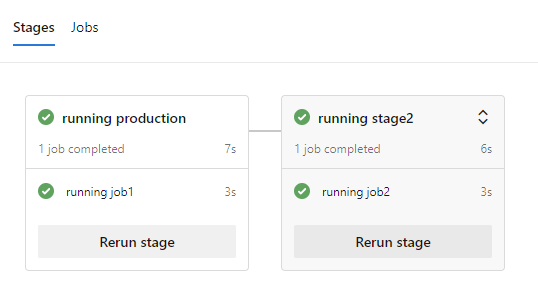
An example can be found in the below picture where the stage2 depends from the production stage and will execute only when the production stage finishes. If the production stage fails, then the stage2 will not continue its execution.
The typical way to define a dependency would be by naming the stages and note on which stage you need your dependencies. For example in the stage2 we use dependsOn with the value stage1
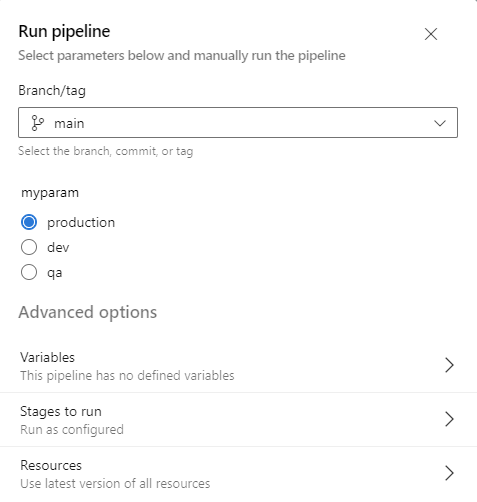
However you can also define dependsOn using a variable. This means that you can dynamically set under which stage another stage will depend and not by setting that as a static variable.
In this guide we will examine how you can deploy pods on your Azure Kubernetes Cluster with Azure devops. In order to getting started you will need to create an AKS cluster under a resource group and connect this cluster with azure devops. After the creation you will need to connect with the cluster and export the kubeconfig file for the ado service connection.
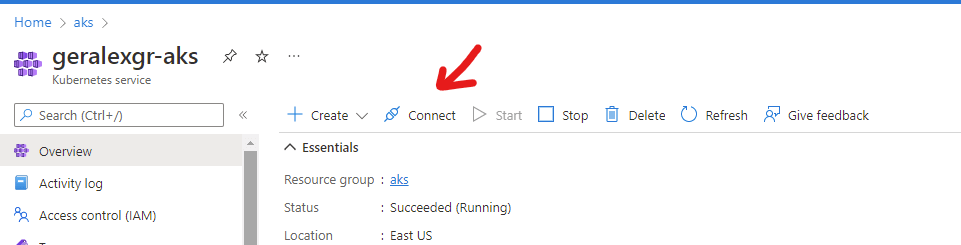
You can do that by pressing connect
You can read the rest of the article on Medium using the link below:
In more detail we will check the dependsOn along with the condition keyword in order to create dependencies between various jobs and indicate which should run first and if it will be executed.
Main scenario We have a stage which contains multiple jobs. This stage could be a larger unit of actions like the deployment to production environment. A procedure like a deployment could be very complex with many different components working together for the outcome. In the stage1 there are 4 jobs with the names job1..4. Job1 needs to run first and the job2 depends on the job1 as a result it needs to wait the execution. Job2 will execute successful or fail based on the input that the user provides. Then job3 and job4 will be executed with a condition. The job3 will be executed if all the previous jobs have succeeded and job4 will be executed if one of the previous jobs had a failure and the pipeline stopped.
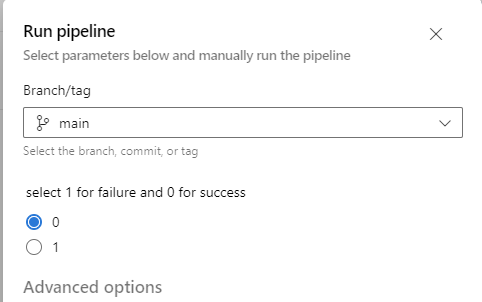
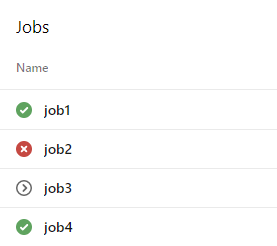
Example 1 We execute the pipeline with parameter equal to 1 in order to have the job2 failed. Then we will see that only job4 runs and job3 will be skipped because of the conditions.
run-1
Code
trigger:
- none

parameters:
  - name: state
    displayName: select 1 for failure and 0 for success
    type: number
    values:
      - 0
      - 1

pool:
  vmImage: ubuntu-latest

stages:
- stage: stage1
  displayName: stage1
  jobs:
  - job: job1
    timeoutInMinutes: 60
    displayName:  job1
    steps:
    - script: echo running task1
      displayName: task1

  - job: job2
    dependsOn: job1
    displayName:  job2
    continueOnError: true
    steps:
    - script: exit ${{ parameters.state }}
      displayName: task will succeed or fail based on user input

  - job: job3
    dependsOn: job2
    condition: succeeded()
    displayName:  job3
    steps:
    - script: echo task to be executed on success
      displayName: execute on success

  - job: job4
    condition: failed()
    dependsOn: job2
    displayName:  job4
    steps:
    - script: echo task to be executed on failure
      displayName: execute on failure
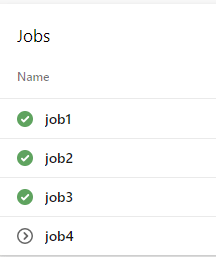
Then we execute the pipeline with parameter equal to 0 in order to have the job2 run. As a result job3 will run and job4 will be skipped.
run-2
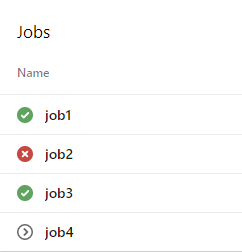
Example 2 We will now execute the same jobs but we will also use the continueOnError keyword on job2. This will allow subsequent tasks to run and skip the failure of the pipeline. By looking at the execution we will now see that job3 seems to be executed in comparison with the run that did not have the continueOnError. This is done because job2 is handled as partially failed and the next steps will continue. The job4 was skipped because pipeline did not recognize a failure.
run-3
If we execute again the pipeline with continueOnError and 0 as the parameter we will get the same result as with run-2.
Microsoft Docs: https://learn.microsoft.com/en-us/azure/devops/pipelines/process/phases?view=azure-devops&tabs=yaml