Posted on Leave a comment

The for_each value depends on resource attributes that cannot be determined until apply, so Terraform cannot predict how many instances will be created.

When working with terraform loops you may encounter the error that is shown below.

The “for_each” value depends on resource attributes that cannot be determined until apply, so Terraform cannot predict how many instances will be created.

I faced this particular issue when I tried to dynamically create a azurerm_monitor_diagnostic_setting resource for multiple web apps.

The for_each code is shown below:

resource "azurerm_monitor_diagnostic_setting" "diag_settings_app" {
  depends_on = [ azurerm_windows_web_app.app_service1,azurerm_windows_web_app.app_service2 ]
  for_each = toset(local.app_service_ids)
  name               = "diag-rule"
  target_resource_id = each.value
  log_analytics_workspace_id = local.log_analytics_workspace_id
  
  dynamic "log" {
    iterator = entry
    for_each = local.log_analytics_log_categories
    content {
        category = entry.value
        enabled  = true

        retention_policy {
      enabled = false
        }
    }
   
  }

  metric {
    category = "AllMetrics"

    retention_policy {
      enabled = false
      days = 30
    }
  }

}

The local.app_service_ids defines the app services IDs.

app_service_ids = [azurerm_windows_web_app.app_service1.id,azurerm_windows_web_app.app_service2.id]

In order to override this issue I used count loop instead.

resource "azurerm_monitor_diagnostic_setting" "diag_settings_app" {
  depends_on = [ azurerm_windows_web_app.app_service1,azurerm_windows_web_app.app_service2 ]
  count = length(local.app_service_ids)
  name               = "diag-rule"
  target_resource_id = local.app_service_ids[count.index]
  log_analytics_workspace_id = local.log_analytics_workspace_id
  
  dynamic "log" {
    iterator = entry
    for_each = local.log_analytics_log_categories
    content {
        category = entry.value
        enabled  = true

        retention_policy {
      enabled = false
        }
    }
   
  }

  metric {
    category = "AllMetrics"

    retention_policy {
      enabled = false
      days = 30
    }
  }

}

terraform apply will then work:

Posted on Leave a comment

Creating Windows/Linux Web App terraform: (Site Name “” / Resource Group “”): web.AppsClient#CreateOrUpdate: Failure sending request: StatusCode=0 — Original Error: autorest/azure: Service returned an error. Status=

I was struggling to create an app service using Terraform with the error shown below. I could not find a way to resolve this as the error message was difficult to interpret.

Creating Windows/Linux Web App: (Site Name "" / Resource Group ""): web.AppsClient#CreateOrUpdate: Failure sending request: StatusCode=0 -- Original Error: autorest/azure: Service returned an error. Status=<nil> <nil>

The code for the service plan was simple enough and I was so confused about this behavior.

resource "azurerm_resource_group" "rg" {
  name     = var.resource_group_name
  location = var.resource_group_location
}

resource "azurerm_service_plan" "app_service_plan" {
  name                = var.app_service_plan_name
  location            = azurerm_resource_group.rg.location
  resource_group_name = azurerm_resource_group.rg.name
  os_type             = "Windows"
  sku_name            = "F1"

}

resource "azurerm_windows_web_app" "app_service" {
  name                = var.app_service_name
  location            = azurerm_resource_group.rg.location
  resource_group_name = azurerm_resource_group.rg.name
  service_plan_id = azurerm_service_plan.app_service_plan.id

  site_config {
    use_32_bit_worker = true
  }
}

In order to resolve I enabled detailed debugging on terraform. As I was using Windows I used on powershell

$Env:TF_LOG = "TRACE"

and then I tried to run terraform apply again.

Terraform will provide detailed information about the running commands, so that I was able to determine the error.

Voila!

AlwaysOn should be disabled as there is a conflict.

In the documentation of azure web app one can find that always on is disabled by default however it does not seem to be correct.

https://registry.terraform.io/providers/hashicorp/azurerm/latest/docs/resources/windows_web_app#site_config

In order to resolve you should add the always_one variable to false.

  site_config {
    use_32_bit_worker = true
    always_on = false
  }

Then you can run terraform apply again, and the resource will be created.

Enable debugging on terraform for your OS:

https://support.hashicorp.com/hc/en-us/articles/360001113727-Enabling-debug-and-trace-run-logs-in-Terraform-CLI-Cloud-or-Enterprise

Update

I perfomed a PR in order to correct the wrong documentation and it has been merged. As a result the documentation will be correct counting from the next deploy.

[Docs fix]Correct docs for resource azurerm_windows_web_app by geralexgr · Pull Request #17051 · hashicorp/terraform-provider-azurerm (github.com)

Posted on Leave a comment

Create multiple environments with Terraform modules – App service Azure example

In this article I will demonstrate how one can create different environments for development needs through terraform modules. Modules provide great extensibility and code reuse. In this example I will use an appservice resource on Azure cloud.

The result of the deployment will be two different resource groups with two app services. The code of the demonstration is located at the bottom of the page.

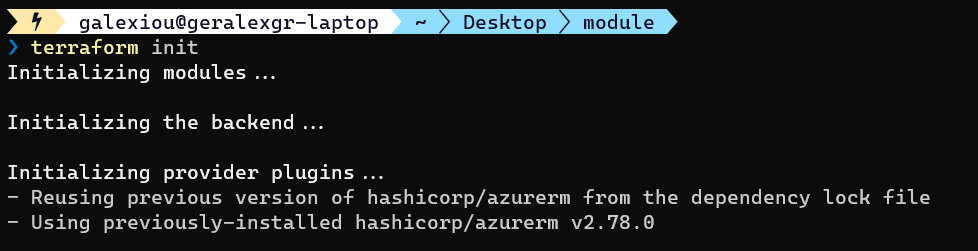
You should first init your module. Navigate to the module folder and perform init

cd modules; terraform init
cd .. ; terraform init

Then validate your terraform code

terraform validate

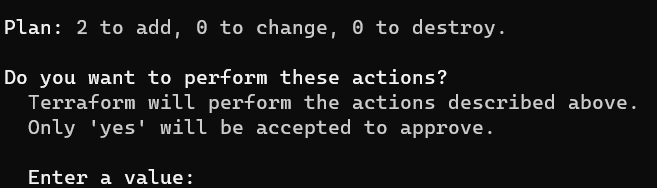
The last step is to apply your configuration

terraform apply

You may encounter an error during the creation of the resources because of the app service name. It should be globally unique.

Change your name and perform a terraform apply again. Terraform will read your .tfstate file and will only implement the differences on infrastructure.

After the successful run you will see the green result output from terraform cli.

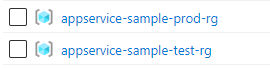
On Azure there should be two resource groups created. One for prod environment and one for test.

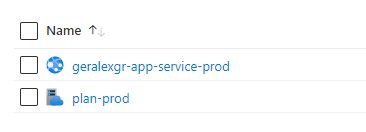
Inside each resource group there should be a different app service the one that it is created through the module according with the settings provided.

Production app service plan

GitHub repository:

https://github.com/geralexgr/terraform-module-environments-deploy

Video tutorial on YouTube: